
Gemini 4 Argon review: documents, writing and code
Gemini 4 Argon is available, but results vary across long documents, visual coding and deployment. Five public tests show how to choose thinking levels and check results, with Google and Orbis setup steps.

The takeaway: choose by task, not overall score
Gemini 4 Argon is worth trying for long-document analysis and complex interactive prototypes; writing and code still need checking against each requirement. In public tests, it can build a black-hole simulation yet also produce deployment files that pass syntax checks but fail to start. Changing the thinking level can even change the answer to the same long-document task.
This guide examines the process and results across five task types, then offers a small exercise with answers you can check yourself.
| Your task | Start here | What to check |
|---|---|---|
| Analyze long reports or weekly reports | Long-document analysis | Whether every number can be recalculated from the source |
| Build interactive websites or 3D prototypes | Black-hole simulation and perfume website | Check functionality, layout and narrow screens separately |
| Write deployment configurations | Kubernetes example | Whether it actually starts and responds to requests |
| Write articles in Chinese | Writing example | Whether it invents experiences or causes absent from the source material |
1. Versions and two different “million-token” claims
Google announced Argon on September 30 and expanded access on October 13. Older articles saying there is “no public model ID yet” should not be treated as current information.Initial announcement · Access announcement
| Item | Current official documentation |
|---|---|
| Model ID | gemini-4-argon |
| Input | Text, images, audio, video, PDF |
| Output | Text |
| Context window | 1,048,576 tokens shared by input, thinking and output |
| Standard synchronous output limit | 65,536 tokens |
| Long decode | Can exceed the standard limit when requirements such as background execution are met |
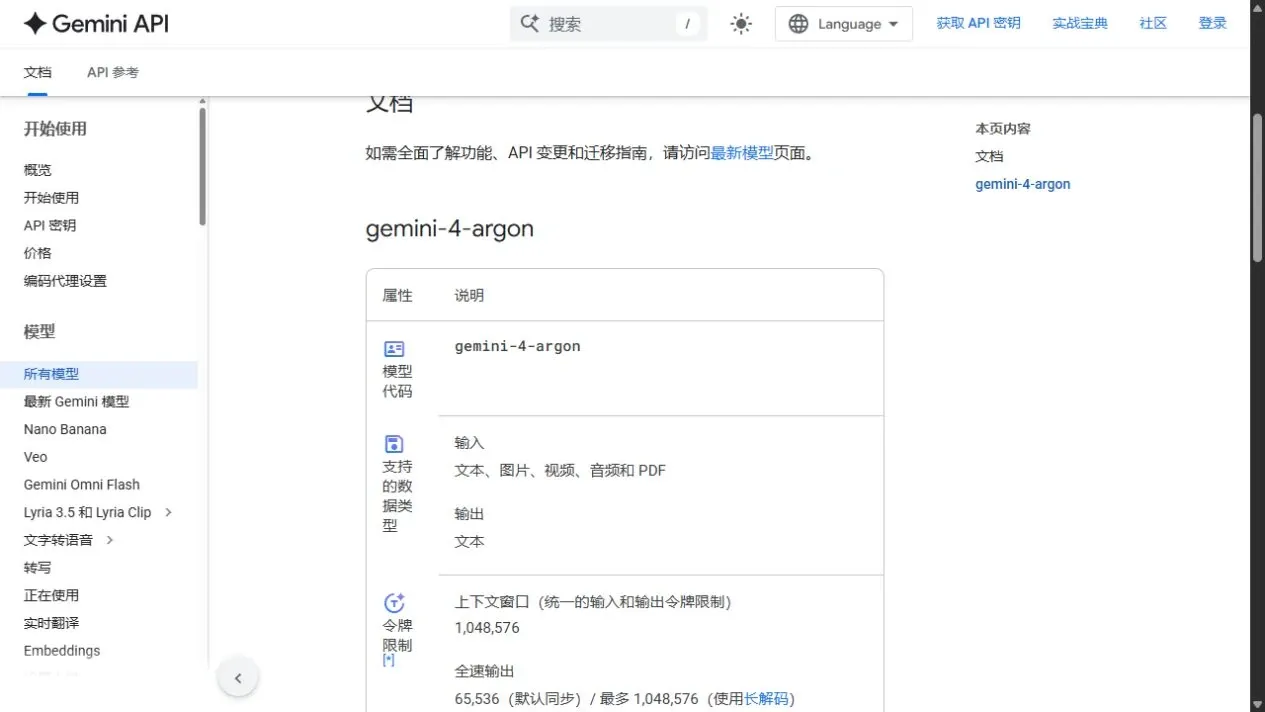
Check “Input,” “Output” and “Token limits” in the table. Source: Google model documentation.
A token is a unit for measuring the content a model processes. Fitting a lot of material, generating a long response and answering correctly are three separate measures. The more space the input occupies, the less remains for thinking and answering.
For very long output, Google's long decode requires activation through methods such as background execution. Increasing an ordinary chat's length setting does not automatically provide a million-token output. Check completion status and actual usage for long background tasks too.
2. Use Google's version: sign in, then select the model
1. Try the web app first
- Open Gemini and sign in to your Google account.
- Confirm that your account has access to Argon. Google's access announcement lists Gemini app subscribers on AI Pro and Ultra; check what is actually available for your account and region.
- Open the model menu, select 4 Argon and check Thinking level.
- Send a short task to confirm access before uploading your own material.
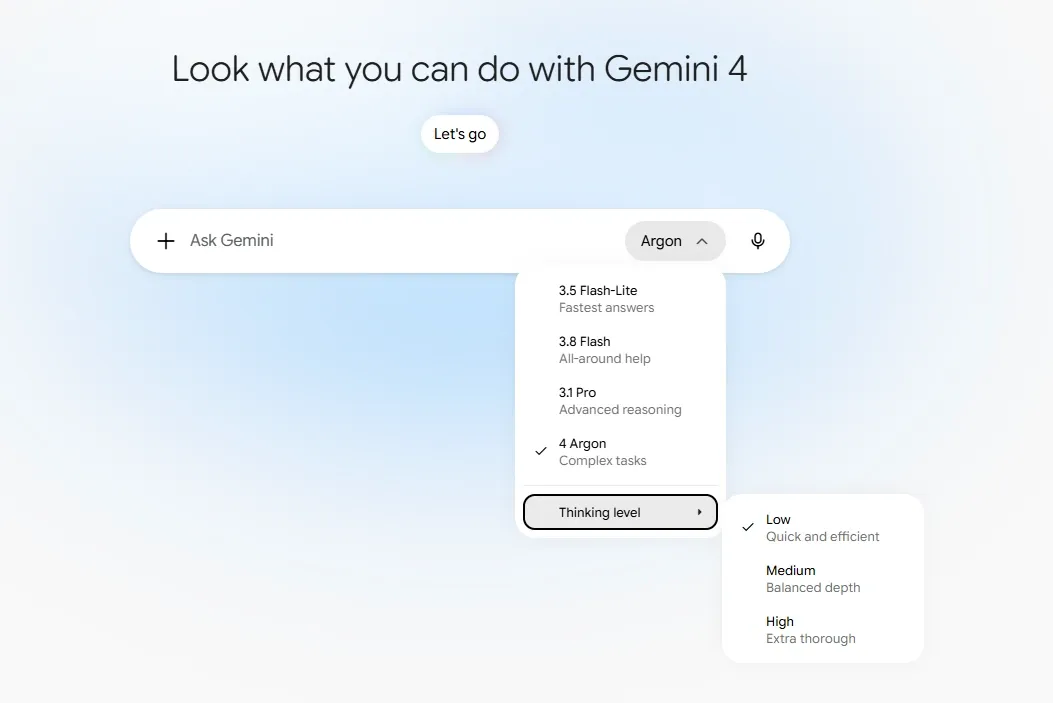
Check the model and thinking level separately. Image: AIWIZ. For official availability, see the Gemini app announcement.
For programmatic access, open AI Studio from the official model page and select a project with API access and available allowance. Check web subscriptions and API project permissions and billing separately.
2. Record the thinking level when comparing results
- For routine organization, start with a currently available standard level.
- For reasoning with multiple conditions or calculations across long documents, try the same question again on High.
- Keep the input and question identical when comparing runs, and record the model, level, tools and wait time.
A single web-app response on Low and an API leaderboard score on High do not represent the same conditions.
3. Five public tests: strengths and failure points
1. Black-hole simulation: an interactive visual prototype
On October 14, Promptslove's Ramanpal Singh demonstrated a black-hole simulation with an accretion disk and star field. Parameter controls changed the display, and the guided tour worked. He rated that build 5/5 but noted that he had not verified the physics equations. Test and demo
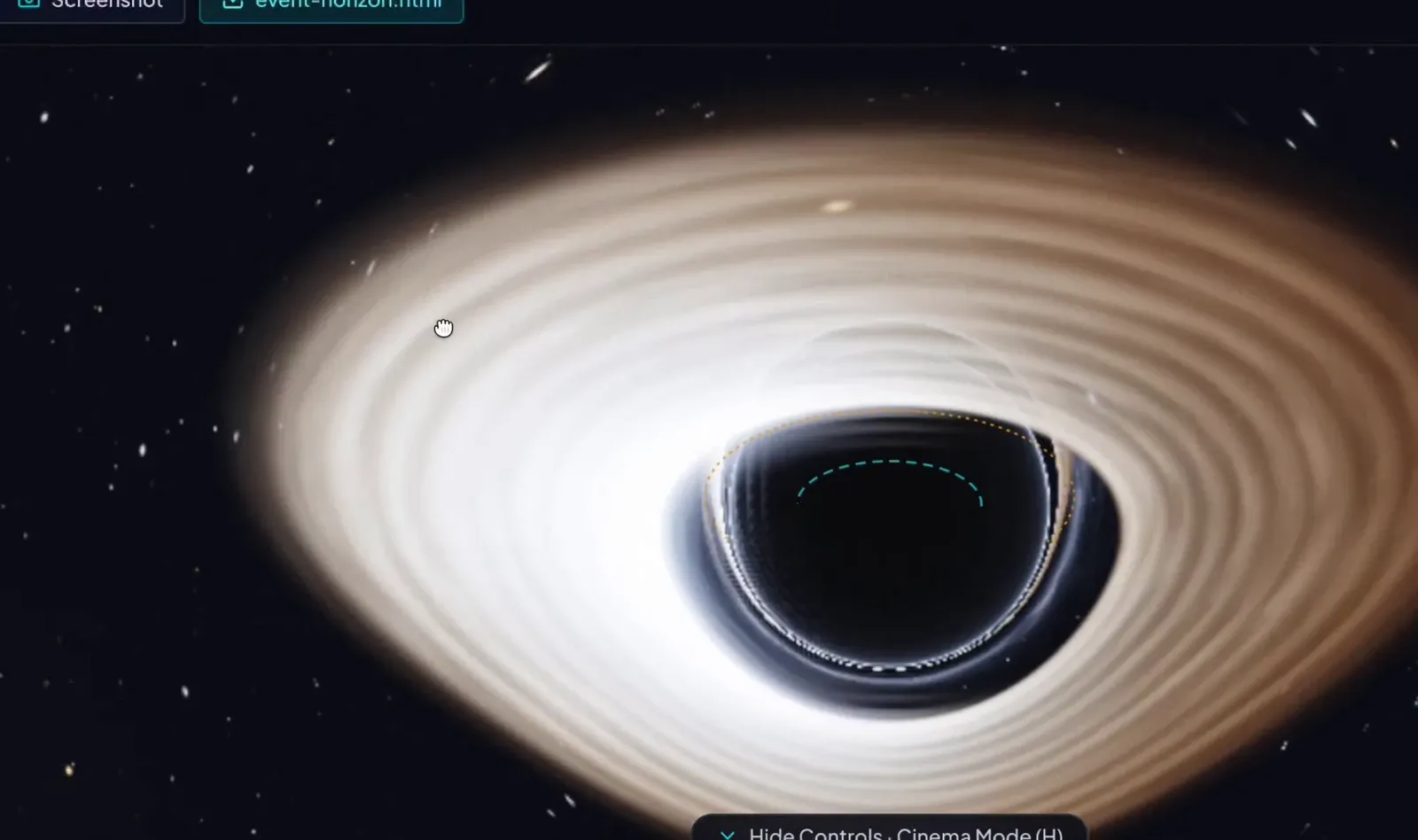
Look at the visual result; physical accuracy needs separate verification. This image comes from the author's black-hole demo.
How to use this example: For an educational demo, check rendering and calculation separately. Try the camera, sliders and reset controls, then verify numerical results against known equations. Animation can explain a concept, but appearance alone cannot establish a simulation's accuracy.
2. Perfume website: a finished build can still miss layout requirements
The same author's multipage perfume website scored only 2/5. It conveyed the brand's visual style, but spacing between headings, paragraphs and buttons, as well as card layouts and scrolling effects, fell short of the requirements. Each task had only one build, so these scores describe those particular outputs. The same test series
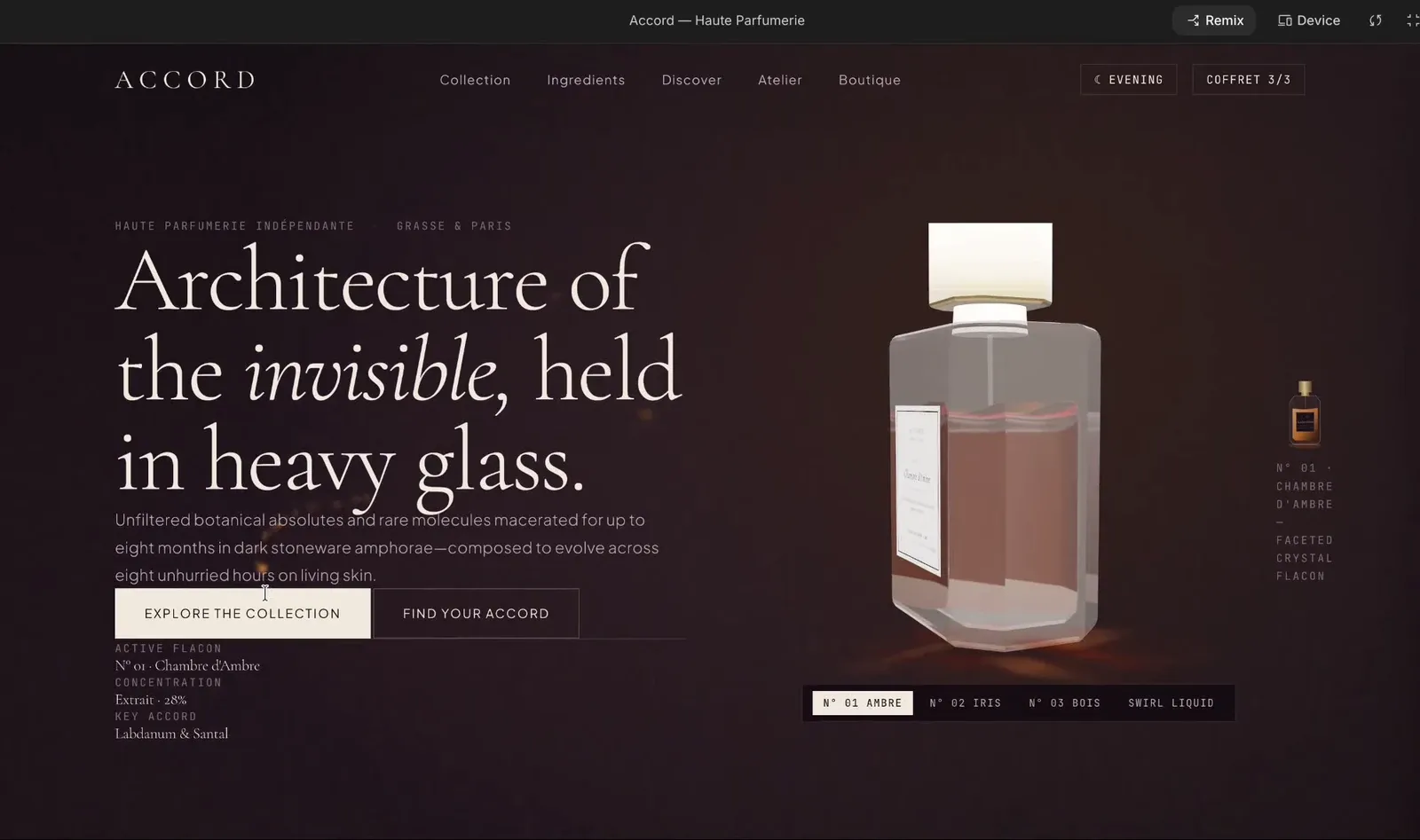
Check the spacing between the heading, description and button on the left. Source: Promptslove's perfume website demo.
Three checks for your own build: Click every main button; check text and cards on a narrow screen; then return to desktop to test scrolling and navigation. Describe issues as “which control, at what width, and what happens” rather than simply asking for “more polish.”
3. Long-document analysis: High was more reliable and much slower
On October 13, AIWIZ used an archive of about 99,000 tokens containing 52 weeks of reports. Questions required finding information across weeks, counting anomalies and calculating spending during promotions. Each configuration ran twice.
| Argon level | Correct answers in each run | Time per run |
|---|---|---|
| Medium | 3/4, 3/4 | 5 seconds, 4 seconds |
| High | 4/4, 4/4 | 117 seconds, 111 seconds |
Medium miscalculated total spending in both runs. High answered this set correctly, but the wait rose to nearly two minutes. Full method and results
In another weekly-report diagnosis task from the same review, the input showed stable spending and clicks but a sudden fall in conversions. The answer below recommended checking tracking or checkout first, then verifying against order records in the back end.
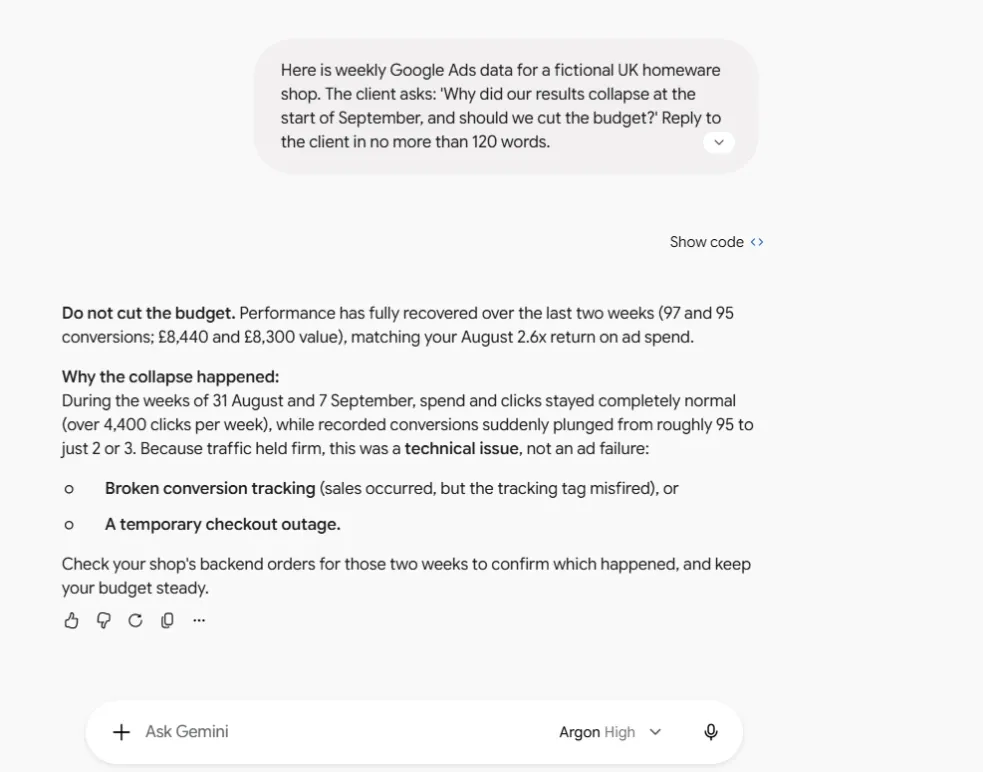
Focus on “verify against back-end records.” This was AIWIZ's weekly-report diagnosis task, separate from the long-archive task in the table above.
How to use it: Ask for the rows used in the calculation before checking the total. A higher thinking level can be one verification step, but keep spreadsheet formulas or scripts as an independent calculation.
4. Deployment code: valid syntax does not mean it will start
ComputingForGeeks' Josphat Mutai asked for an nginx deployment running as a non-root user and tested it on a real k3s cluster. Argon ran three times under each of four settings: default, Low, Medium and High. All 12 configurations passed syntax checks, yet all failed to start.
The runtime user could not write to directories nginx needed. After receiving error logs, all three fixes responded to requests, but two changed the image and port specified in the task. Test environment and fixes
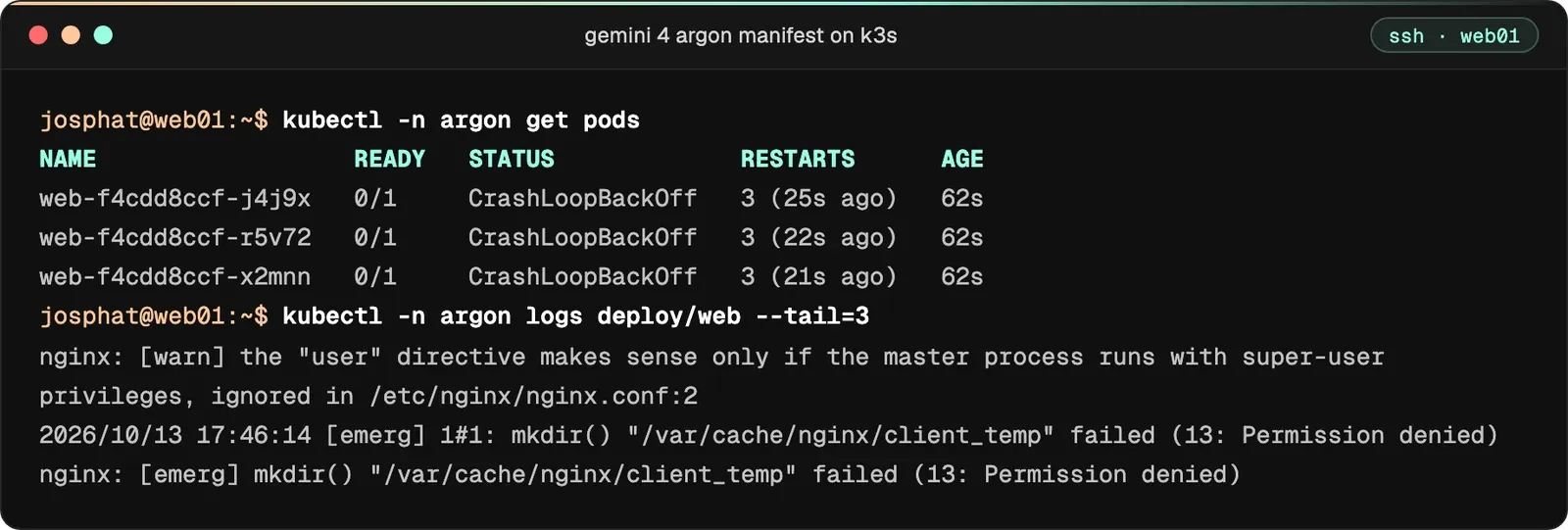
Check CrashLoopBackOff first, then Permission denied. Source: ComputingForGeeks' log screenshot.
For beginners, remember two checks: it runs, and it still meets the original requirements. After a fix, recheck the image, port, permissions and data location. The disappearance of an error is not enough.
5. Chinese writing: check invented causes as well as fluency
AdenXie's Chinese-writing comparison included a task asking for a long article from sparse source material. Argon connected the material into coherent paragraphs but also supplied causes and degrees of intensity the source did not establish. Each question ran only once, and the two sides had different background information and product conditions. The test is useful for examining specific outputs, not declaring an overall winner. Original article and test conditions
For an article about personal experiences, start with an instruction like this:
First list the facts explicitly stated in the material. Ask me about any missing dates, motives or feelings, and label suggestions separately. If the material is insufficient, shorten the piece instead of inventing experiences for me.
After revision, check phrases such as “because,” “therefore,” “the hardest” and “the first time” sentence by sentence. Identify which judgments need your personal confirmation.
4. Why one leaderboard cannot explain these differences
Vals Index v2.1 ranked Argon first on its October 18 page, with a score of 68.90%. It measures tasks in finance, coding, law and tax, combining them with industry weights.
In the launch evaluation by another organization, Artificial Analysis, Argon High's overall index was 53. Automation and terminal tasks also had different rankings in the same set of charts.
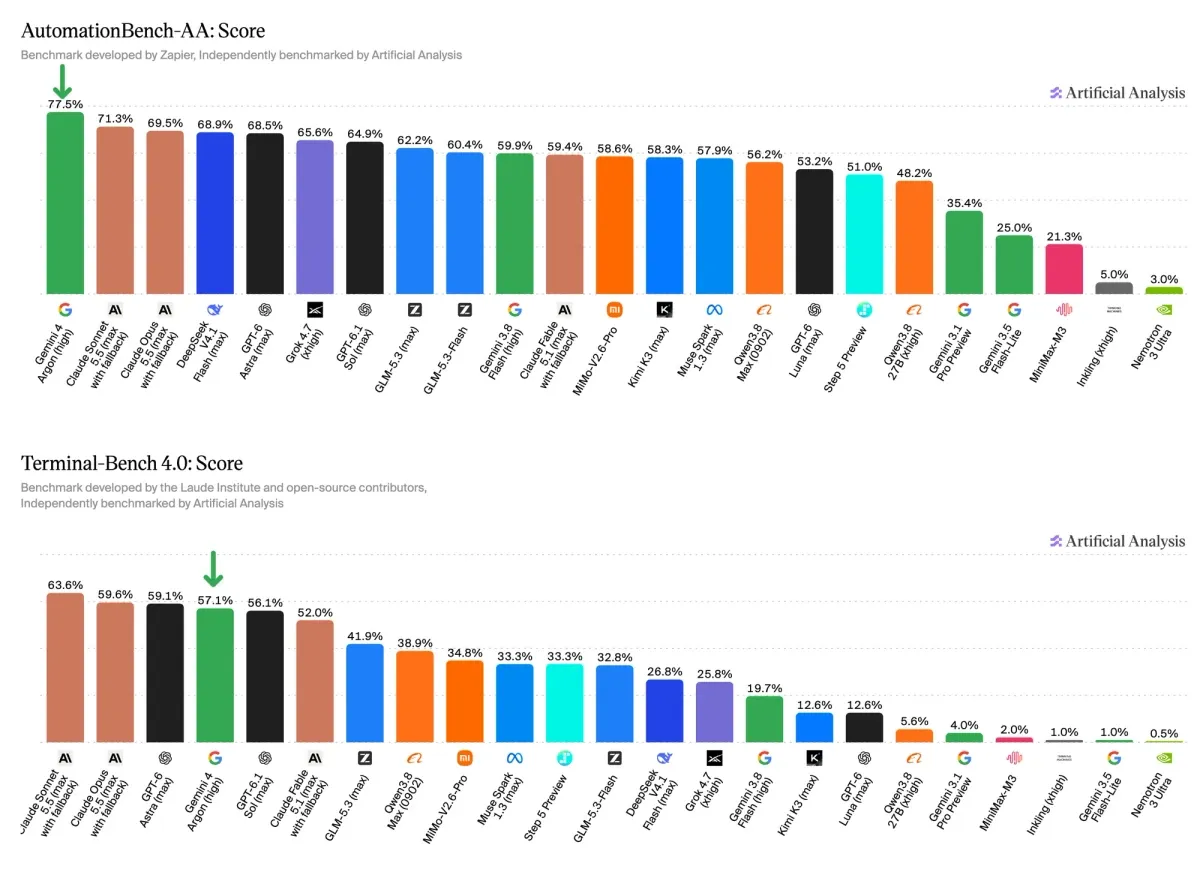
Look at the green arrows: Argon ranks near the top in automation in the upper chart, but is not first in terminal tasks below. Source: Artificial Analysis's September 30 launch evaluation.
Use leaderboards to shortlist models and your own tasks to decide. When comparing models, at least align the question, thinking level and acceptance criteria, then record the number of fixes and total usage required to finish the task.
5. Optional: access the same model through Orbis
If you already use a tool compatible with OpenAI's API, start from Orbis's Gemini 4 Argon model page.
- Sign in to Orbis and choose a route on the model page. This example uses the Gemini · KO route.
- Get a key for that route, open “Quick access” and check the three settings below.
- Enter them in your tool's custom-provider settings. Save, send a short message, then check the model and route in the usage logs.
| Field | Value |
|---|---|
| Base URL | https://api.orbiorbi.com/v1 |
| Protocol | OpenAI Chat Completions |
| Model ID | gemini-4-argon |
| API Key | An Orbis key for the selected route |
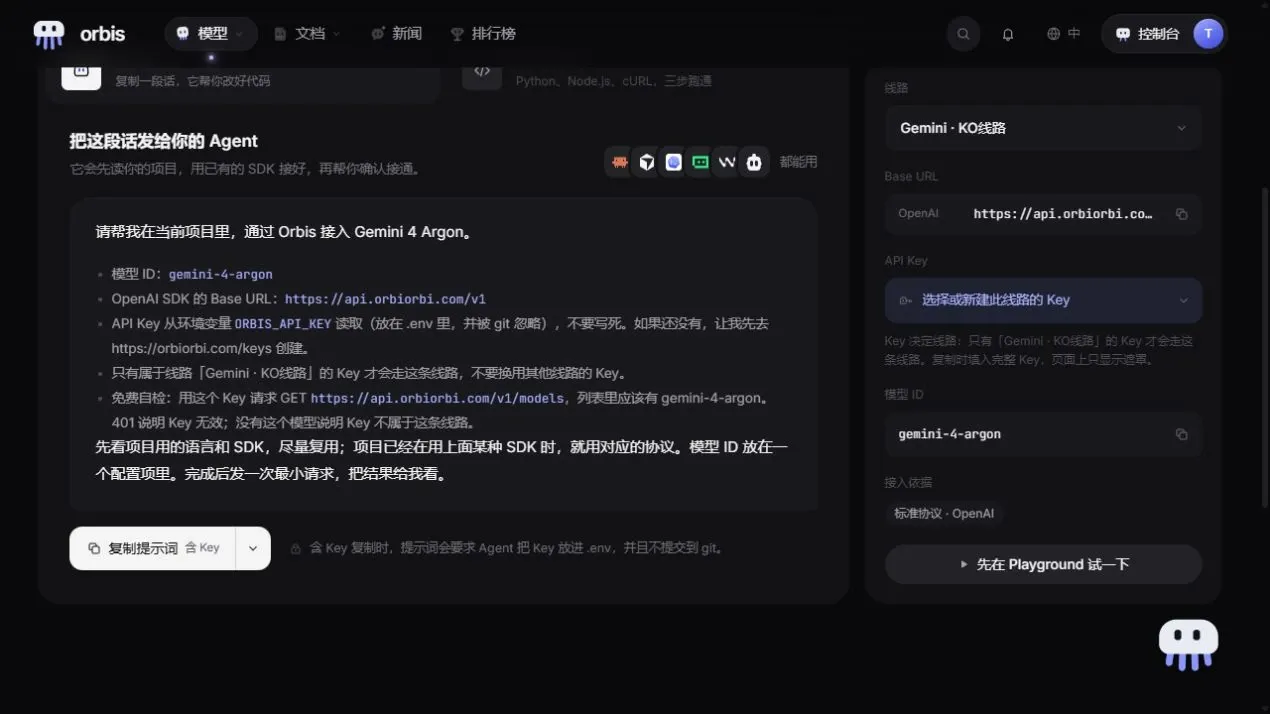
The explanation on the left and configuration on the right must refer to the same route. The key determines the route; changing the model ID does not automatically switch routes.
The KO route page here lists a maximum output of 64K. Do not assume Google's native million-token long decode, tools or multimodal capabilities carry over to a compatible API. Check the selected route's current documentation for thinking parameters, file input and tool support.
6. Use a small table to check whether it really calculated correctly
Start with the 12-week practice table rather than uploading a very long report on your first attempt.
- Choose a model and level, upload the table and send the task below.
- Compare with the answer key and check the calculation row by row.
- Start a new conversation, keep the input and question identical, and run it again at another level.
Read this weekly report. List the promotion weeks and their spending, then calculate total promotion-period spending. Identify weeks with normal clicks but clearly unusual conversions. Distinguish observations directly supported by the data from possible causes that need investigation. Do not delete weeks with zero conversions.
Record just four things: whether the answer was correct, how long it took, how many follow-ups it needed and how much allowance it used. For long documents, check sources and calculations first; for websites, check interactions and screen sizes; for code, run it and then recheck requirements; for writing, verify facts first.
Further reading
Specifications and availability were checked against Google's current documentation. Examples come from Promptslove, AIWIZ, ComputingForGeeks and AdenXie, with their test procedures linked above. The user-provided AIHubMix reference helped identify specification and testing leads; the API instructions have been reorganized around the access methods actually covered here.
Appendix: 12-week practice table
Copy the CSV below and save it as 周报.csv, then upload it to the model. It contains 12 weeks of data, with field names in English.
week,spend,clicks,conversions,promotion
W01,1000,4000,80,no
W02,1100,4200,84,yes
W03,900,3800,76,no
W04,1200,4400,88,yes
W05,1050,4100,82,no
W06,1300,4500,90,yes
W07,1150,4300,0,no
W08,1180,4350,3,no
W09,1250,4450,89,yes
W10,980,3900,78,no
W11,1400,4700,94,yes
W12,1080,4150,83,no
Appendix: answer key
After completing the exercise, expand the answer key
This is a small practice dataset accompanying the article, not the 52-week archive in the original review.
Spending in promotion weeks
| Week | spend |
|---|---|
| W02 | 1100 |
| W04 | 1200 |
| W06 | 1300 |
| W09 | 1250 |
| W11 | 1400 |
| Total | 6250 |
In a spreadsheet, filter for promotion=yes and sum spend, or calculate 1100+1200+1300+1250+1400 individually.
Anomaly observations
- W07 has 4300 clicks and 0 conversions; W08 has 4350 clicks and 3 conversions.
- Clicks in surrounding weeks are similar, with conversions usually numbering in the dozens or more, so W07/W08 warrant investigation.
- The data alone cannot establish whether this is a tracking failure, checkout failure, business change or missing records. Check orders, tracking events and other records.
- Do not delete W07 because it has 0 conversions. Do not divide by 0 when calculating cost per conversion; mark it as not calculable and keep the record.
Even with correct numbers, check whether “possible causes” have been presented as confirmed facts. For a repeat test, record the model, thinking level, use of calculation tools, elapsed time and actual usage.