
Gmail MCP email sending: today’s docs differ from the viral post
Google is moving AI tools to its official Workspace interfaces. Its current Gmail MCP docs list sending, but endpoint choice and human approval support determine what an assistant can actually do.
On November 24, Google made its official MCP servers and command-line tool generally available for Gmail and seven other Workspace services. AI tools accessing Workspace data must use the official interfaces from February 1, 2027. MCP is a common interface through which AI assistants call external services: to search email or organize files, an assistant sends requests to Google through these tools.
The argument quickly reached the Send button. A November 26 TechStackups report said the public Gmail MCP server could only create drafts, with sending, replying and forwarding reserved for partners. The article drew more than 200 comments on Hacker News. On Reddit, a user asked why moving to Google's official tools might mean losing a feature their Claude connector already supported.
The Google documentation we read on November 27 now lists sending, replying and forwarding. What an email assistant can do depends on which endpoint it uses and whether the assistant can display Google’s approval interface. Our view is that migration should preserve the full process from drafting to sending. Changing an interface address should not leave users going back to Gmail to finish the job.
Gmail MCP email sending: how the two endpoints differ
Google provides two Gmail MCP endpoints: /mcp/v1 and /mcp/v1self. The two endpoints expose different tools.
The full /mcp/v1 endpoint lists send_message, alongside reply and forward tools. The sending tool can create and immediately send a new message, or take an existing draft's ID and send that draft. Google's quota table also lists these operations among generally available tools.
To use the full endpoint, the application hosting the email assistant—the MCP client—needs to support Google's form elicitation mechanism for approvals. When an AI is ready to send, the server can request confirmation, which the client presents as an interface a person can use. Google's example displays the recipients, subject and message, with Don't allow and Allow once buttons. Users can inspect what will be sent before deciding whether to proceed; whether they are prompted every time also depends on user and administrator settings.
The email assistant has to implement this interaction. A client that supports it can receive the request, display it and return the user's choice. Clients without that support can use the /mcp/v1self fallback endpoint. But its tool list omits sending, replying and forwarding. A successful connection does not grant those three capabilities.
Two assistants can both be described as connected to Gmail MCP and still deliver different experiences. One can help revise a draft and send it after approval; another may only leave the draft in the mailbox. Google's documentation lists sending support on the full endpoint, but each assistant still needs the corresponding interaction support and account authorization.
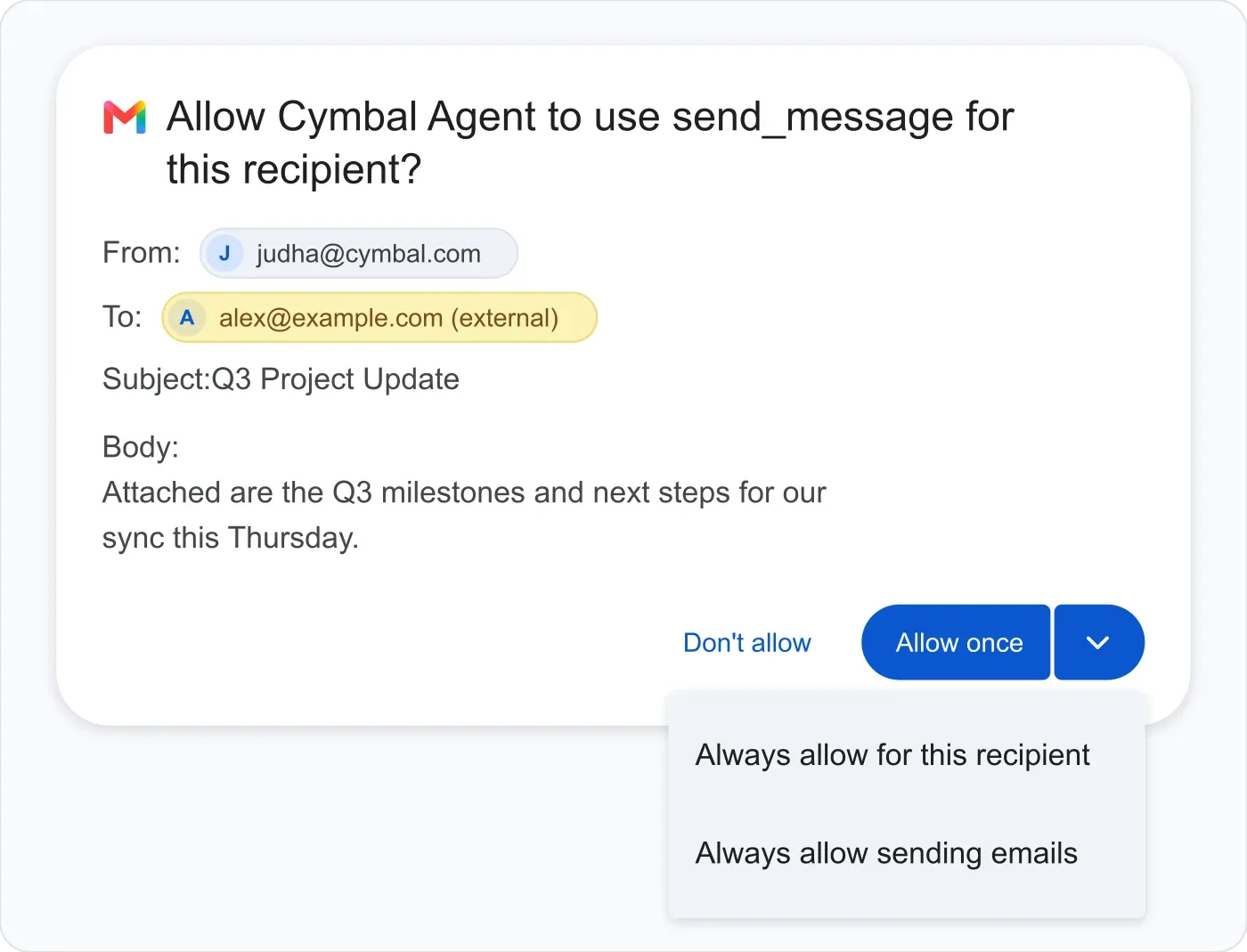
Image: The email approval dialog in Google's developer documentation. Source: Google Workspace.
Email assistants need to complete the last step
The Reddit poster compared the official tools with their own Claude connector: they had already tested sending, yet could not find the same capability in Google's documentation. For users in that position, a migration notice can easily sound like a feature cut.
The tool catalog itself has also confused developers. In a November 27 DEV Community post, frank chu documented an unauthenticated probe on the afternoon of November 26, Mountain Standard Time. Across 30 tool-list requests to the same Gmail endpoint in 11 seconds, 18 returned 23 tools and 12 returned 30. The longer list included sending, replying and forwarding. He did not test execution with a real account; his record shows inconsistent tool-catalog responses at that time.
If an assistant reads the catalog only once at startup, it will plan tasks around the tools returned by that request. Alongside implementing the approval interface, migration should check the tool list available to the current account and the actual response to a send request. Between a tool appearing in documentation and a message successfully leaving the mailbox, the client and permissions still have to do their part.
Google's configuration guide can also leave readers thinking the process stops at a draft. Its test example asks the AI to create a draft, then directs the user back to Gmail to review and send it. That can look like the limit of official support. The full tool list, however, includes a separate sending tool; the configuration example does not demonstrate every capability.
Email assistant users can ask the product provider directly: will revision and sending still work after migration? Will the approval interface appear inside the assistant? If the tool can only create drafts, users will still need to send from Gmail. Developers should walk through the full sequence of finding a message, drafting, revising, approving and sending, with user approval before the send step.
We support showing users the message before it is sent. Email read by an AI can itself contain instructions; displaying the recipients and content lets users make an explicit decision before a message leaves their account.
Migration in February, Scaled Tier billing in April
Beyond functionality, developers need to plan around two dates. February 1, 2027 is when the AI access requirement begins to be enforced: tools accessing Workspace data must use the official MCP servers or CLI. Traditional applications that do not use AI can continue using REST interfaces. The Gmail API is not shutting down across the board that day.
Scaled Tier billing starts on April 1, 2027. The Standard Tier remains free, with 5,000 requests per day, per project, per product. Multiple users on one project share that allowance. Switching between the full and fallback endpoints does not create another allowance.
The meaning of 5,000 requests also depends on the operation. Each Gmail search or draft-list call counts as 10 requests. If a project did nothing but search all day, the allowance would cover at most 500 searches. Reading messages, creating drafts and sending would draw on the same allowance. A multi-user product needs to budget for total project usage, rather than assume 5,000 requests for every user.
For projects enrolled in the Scaled Tier, Gmail and the other affected MCP services begin billing from the first successful request on April 1. The immediate priorities are therefore to complete the approval interaction and assess whether the project needs the Scaled Tier. Users can keep their existing assistants while checking the migration plan: will revision and sending remain available, or will the last step require a trip back to Gmail? A claim that the official MCP server cannot send email is no reason to abandon a workflow that already works for you.
Further reading
- Google Cloud: Official Workspace AI interfaces and migration date
- Google: Gmail MCP configuration and the two endpoints
- Google: Current Gmail MCP tool list
- Google: The send_message tool
- Google: Project quotas and tool request counts
- Google: Workspace usage tiers and timeline
- frank chu: Public tool-catalog probes returning 23 or 30 tools
- TechStackups: The November 26 report that prompted debate
- Reddit: jemattie's question about sending email