
GPT-6.2 Astra vs Sol: Use Sol for everyday work
OpenAI updated Astra and Sol together. Start with Sol for routine code changes and weekly reports. When a task calls for tough choices about what to keep or how to structure it, try the same task with Astra. Here's where to access both models and what the standard API costs.
OpenAI released GPT-6.2 Astra and GPT-6.2 Sol early on November 18, Beijing time. Plus, Pro, Enterprise and Edu users can select either model in ChatGPT Work and Codex, and developers can access both through the API. If you already use Sol to write weekly reports, update pages or add tests, the new Sol can stay your default. Save Astra for the jobs where you usually end up redoing the first draft yourself.
After launch, one user in a Codex discussion thread reported seeing only Astra. Another updated their comment to say both models had arrived. If you haven't seen the new models yet, check the model picker in Work or Codex and wait for them to appear in your list.
GPT-6.2 Astra vs Sol: Start with what you need to deliver
Say you need to add a filter to an existing page. The component already exists, the interaction stays the same, and tests can help determine whether the code is ready to merge. With acceptance criteria this clear, try Sol first. Cognition's FrontierCode 2.0 assigns tasks from real codebases and checks whether the changes meet maintainers' standards for merging. According to OpenAI's announcement, at the highest reasoning setting for both models, Sol finished just 0.5 points behind Astra on this merge quality benchmark and cost about one-fifth as much.
The job gets harder when you start with a pile of source material and need a deck you can present as is. You have to decide which slides to keep from last quarter, where to put this quarter's updates, and whether the charts and speaker notes still work. OpenAI showed Astra making a slide deck from a reference template. The launch page also shows a paper lamp: the team had Astra incorporate the curved profile of the balconies at Chicago's Marina City into the lampshade, then built the lamp from the plans.
OpenAI used GDPval v2 to test extended workflows from real projects. The new Astra scored 6.2 percentage points higher than its predecessor while using 22% fewer output tokens. Sol scored 5.3 percentage points higher than GPT-6.1 Sol. If you have a report you always have to restructure before handing it in, try it with Astra. That will tell you more about how much rework Astra saves than a question you make up on the spot.
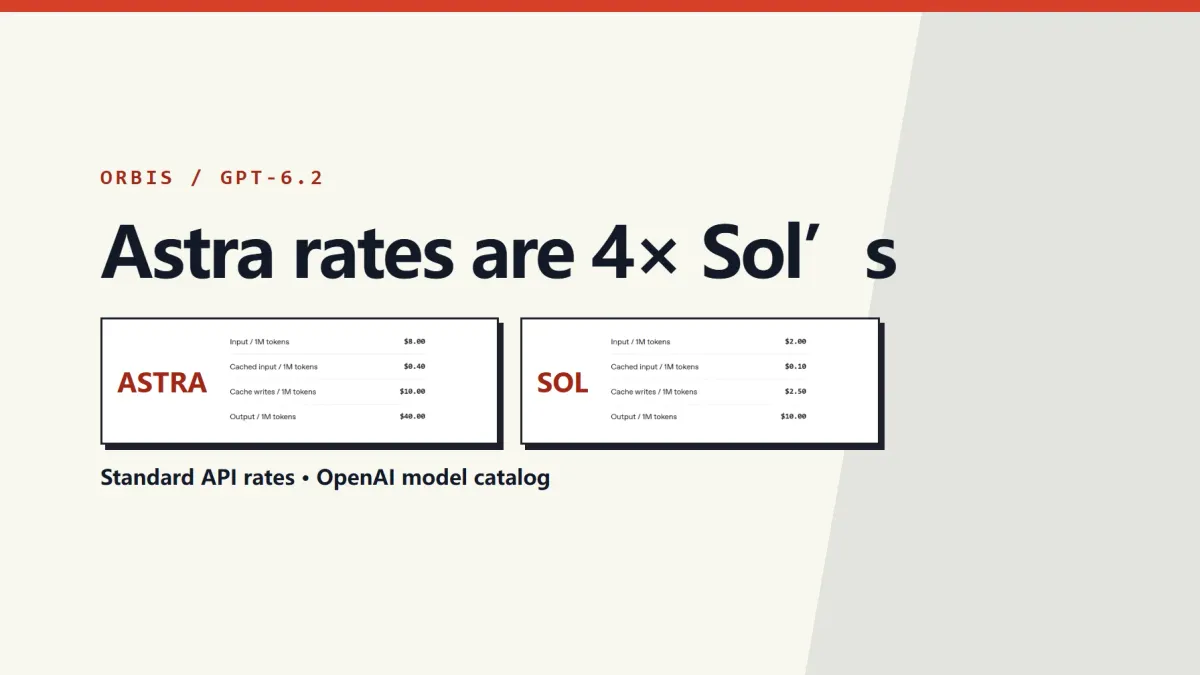
Astra's rates fell 20%; it still costs four times as much as Sol at equal usage
Compared with its predecessor, the new Astra's standard API rates fell 20% for input and output and 60% for cached input. The new Sol keeps GPT-6.1 Sol's pricing. Here are the rates for input, cached input and output per million tokens, the units used to measure how much content the model processes:
| Standard rates | Astra | Sol |
|---|---|---|
| Input | $8 | $2 |
| Cached input | $0.40 | $0.10 |
| Output | $40 | $10 |
Astra's rate is four times Sol's in all three categories. To calculate an API bill, multiply the rates by the number of tokens the model actually reads and generates. If you use a subscription, check your plan's usage allowance. The API charges for actual usage at the applicable rates.
Test both on last week's biggest rework job
Pick the task that took the most rework last week. It could be a report that missed a key figure and sent you back to redo a chart. Give Astra and Sol the same source material, the same version of the template and the same requirements. First check which version includes everything it needs to. Then record how long it takes to make each draft usable. If you use the API, note both costs alongside those times. If you already have a reliable GPT-6.1 Sol workflow, keep its output for comparison.
If Astra catches a key figure that Sol misses or saves you from restructuring the whole thing, give Astra that kind of work. For jobs with existing components, tests or a fixed layout, give Sol the first pass.