
Inkling 2 Mini opens its weights: a 20GB model that takes extra passes
Thinking Machines reuses the middle 12 layers three times in Inkling 2 Mini. Its offline town is compelling, while day-one speed and loading reports show why runtimes still matter for a small local model.
On November 20, Thinking Machines released Inkling 2 Mini, an open-weight model that handles text and images, writes code, and calls tools. Its original mixed low-precision weights take up about 20GB, and it uses the Apache 2.0 license. Official support for Apple computers starts at 32GB of memory, with options for DGX Spark and third-party GGUF quantizations as well.
The release quickly climbed near the top of the Hacker News front page, while local-model users on Reddit began comparing it with Qwen3.8-27B. Their question is straightforward: on the same computer, can this model do more, and how much slower will it be?
Inkling 2 Mini’s most interesting design choice is to reuse a middle group of computational layers. The computer stores one set of weights, but the input passes through those layers three times. It aims to trade more computation for capabilities that fit within limited memory. For anyone who wants to run a coding agent on their own computer, that is more interesting than parameter count alone.
Inkling 2 Mini runs a small town on an offline computer
The team demonstrated this local capability with a pixel-art town. On an M5 Pro MacBook Pro with 48GB of memory in airplane mode, the model organizes the lives of 20 villagers, lets them interact, and responds to messages left on their doors. With the network disconnected, the town’s characters are still driven by the local model.
The villagers plan their daily activities, chat and gossip, and hold baking competitions. Players can leave messages on their doors and wait for a response. Another official demo shows the model generating a playable flight simulator offline during a flight.
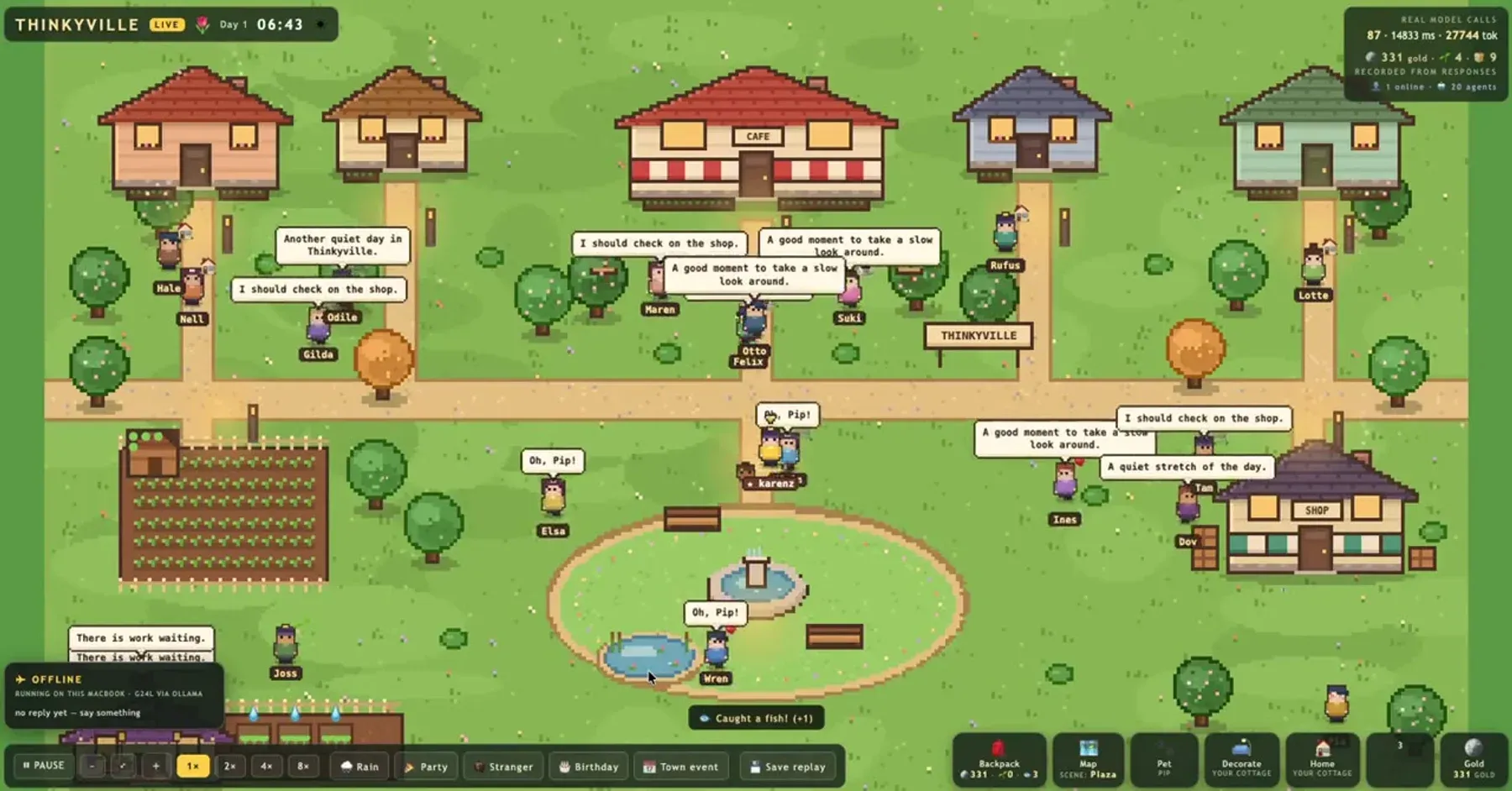
Thinkyville offline town demo. Source: Thinking Machines.
Two extra passes through the middle 12 layers save on weights
The town runs on a machine with 48GB of memory. To understand how much work a computer like this can do, start with how it reuses the model’s weights.
A conventional model’s computational layers work like an assembly line: the input moves through each layer in sequence, eventually producing the next character or word. Inkling 2 Mini stores weights for 24 layers. The first six process the input, the middle 12 run three times in a row, and the final six finish the job. That adds up to 48 layer computations for every token, the small chunk of text a model works with.
The results of each middle pass carry over to the next, so later passes work on information that has already been processed. Think of a set of workstations repeatedly handling the same unfinished item: there is no additional equipment, but there are more processing steps. Fewer workstations save floor space; the time needed for three passes still has to be paid.
It also uses a mixture-of-experts (MoE) design, which assigns some of the model’s work to different “experts” and selects only a subset for each computation. Inkling 2 Mini has 26.4 billion parameters in total, with 3.4 billion active in each selection. According to the official model card, each additional pass through the middle layers adds about 1 billion parameters’ worth of computation. Two extra passes therefore add 2 billion to 3.4 billion, giving an effective active parameter count of about 5.4 billion per token. The same weights are used more times; the computer does not need to store two more copies of the middle layers.
Small weights and fast execution are therefore separate things. Looping gets more use out of the same weights, while requiring the computer to do more computation and move more data. In the Hacker News discussion, some see the design as a way to ease memory-capacity constraints. Others point out that consumer computers also face bottlenecks in memory bandwidth, compute, and storage. Getting the file into memory is only the first step.
Day-one experiences diverge, with runtimes another variable
Speed reports were already diverging on release day. In r/LocalLLaMA, an RTX 4090 user reported generating roughly 190–220 tokens per second after modifying vLLM, with about 35K of context fitting into 24GB of VRAM. They used mixed-precision weights and an FP8 cache. Another user in the comments, running llama.cpp, reported just 40–60 tokens per second. Their software and configurations differed; choosing the right way to run the model comes before a meaningful comparison.
Unsloth’s launch thread also included reports of loading failures and crashes as conversations began. On November 21, the team posted a fix, asking users to update both Unsloth and the llama.cpp runtime to address excessive context memory use and loading problems. In that thread, a user with an M4 Pro and 48GB of memory reported roughly 100 tokens per second in preprocessing and 25 tokens per second in generation at about 30K context. The first figure measures reading the prompt; the second measures how quickly the answer comes out.
Long conversations need additional memory, too. The KV cache stores the results of earlier computation while a model runs. Hugging Face’s architecture description explains that each pass through the looping layers keeps its own state. More preceding text generally means a larger cache, so the usable context on a 32GB machine must be budgeted alongside the weights, runtime, and other software.
In other words, 32GB is the starting point for officially supported Macs, while 20GB is the size of the original weights. Image-processing components, conversation caches, the runtime, and other software still need space. The 48GB machine in the town demo has a meaningful amount of extra headroom over that minimum.
Worth trying for coding; keep your main chat model for now
What do these costs buy? The clearest use case so far is a local coding agent. Under the corresponding test settings in the model card, Inkling solved 48.2% of tasks on DeepSWE v1.1, compared with 42.2% for Qwen3.8-27B. On SWE-bench Pro v2 Hard, the figures were 77.9% and 73.8%, respectively. Both scored 5.6% on Terminal Bench 4.0, however, so the advantage does not extend across all coding tasks.
Chat users should consider the other side. The team acknowledges that Inkling still trails Qwen3.8-27B in multi-turn conversations and instructions with multiple simultaneous requirements. The model card also notes awkward Chinese phrasing and mixed Chinese-English output, along with a tendency to repeatedly check code while debugging without moving forward. It is worth trying if your main work involves repeated code revisions. If you spend your days in long chats or writing Chinese, your existing Qwen model is still worth keeping.
For existing Qwen users, the best approach is to keep the old model and try Inkling on familiar coding tasks. Whether it finishes, how many corrections it needs, and how long you wait will determine its place on your computer faster than a leaderboard will. For those who want characters, tools, or coding workflows on an offline computer, the official town and flight-simulator demos also suggest directions to explore.
Mac and GGUF offer separate routes: update before downloading
To get started, choose a route based on your hardware. Mac users can begin with the Ollama model page and the command ollama run inkling-2-mini. When checked on November 21, the page still required a Mac with at least 32GB of memory and directed users to an Ollama preview release, with support for Windows and other hardware to follow. If you have the stable release installed, check the model page for the current support status first.
For GGUF, look at Unsloth’s quantized files. Its recommended UD-Q4_K_XL version is about 17–18GB. Lower bit widths can save more memory, but quantization also changes the output. Runtime versions matter especially here: older software may not recognize its looping architecture and weight format. Today’s fix post calls for updating the software and runtime; those using upstream llama.cpp on its own also need Unsloth’s GGUF built specifically for upstream. Before downloading the weights, make sure the files and runtime match.
For ordinary testing, choose the standard Mini, which runs a fixed three passes. Thinking Machines has also opened a research version with an adjustable number of passes. Goodfire received early weights to study how information moves across layers and loops. Hugging Face’s research-version example allows the number of passes to be set. If you want to investigate how much another pass helps, the research version is the one to use.
Inkling 2 Mini offers a concrete new option: reuse existing weights through repeated computation to fit stronger model capabilities into a local computer. Mac users with at least 32GB of memory, and local developers willing to try new runtimes, can now add it to their shortlist.